SQLCipher for Apple FIPS
Introduction
This document describes the steps that differ from the standard SQLCipher for Apple integration instructions when using the FIPS package. Follow the base documentation for project setup, adding SQLCipher.swift or SQLCipher.xcframework to your project, Other C Flags, and Preprocessor Macros, and apply the changes below.
SQLCipher for Apple FIPS is available exclusively through Enterprise licensing directly from Zetetic. You will only be able to use platforms for which you've purchased licenses. Attempting to use a platform you're not licensed for will result in an SQLITE_AUTH(23) error.
Package Contents
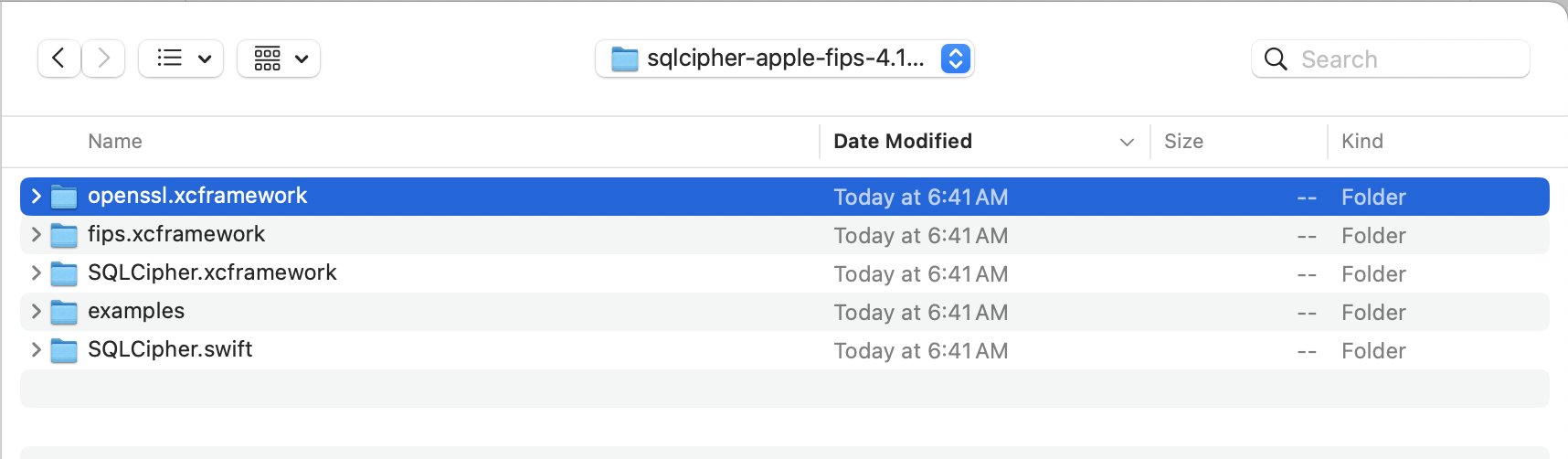
In addition to the SQLCipher.xcframework and SQLCipher.swift Swift Package that ship in the standard package, the FIPS package also contains:
fips.xcframework: FIPS validated cryptographic module (required on all Apple platforms)openssl.xcframework: OpenSSL framework (required for iOS targets only)
The supplied SQLCipher.xcframework is built for:
- iOS devices (arm64)
- iOS simulators (arm64 for Apple Silicon, x86_64)
- macOS (arm64 for Apple Silicon, x86_64)
Integration Steps
Begin by following the base SQLCipher for Apple instructions to add SQLCipher.swift or SQLCipher.xcframework to your project. Then perform the additional steps below using the artifacts from the sqlcipher-apple-fips-4.19.0 package.
Add fips.xcframework to your Project
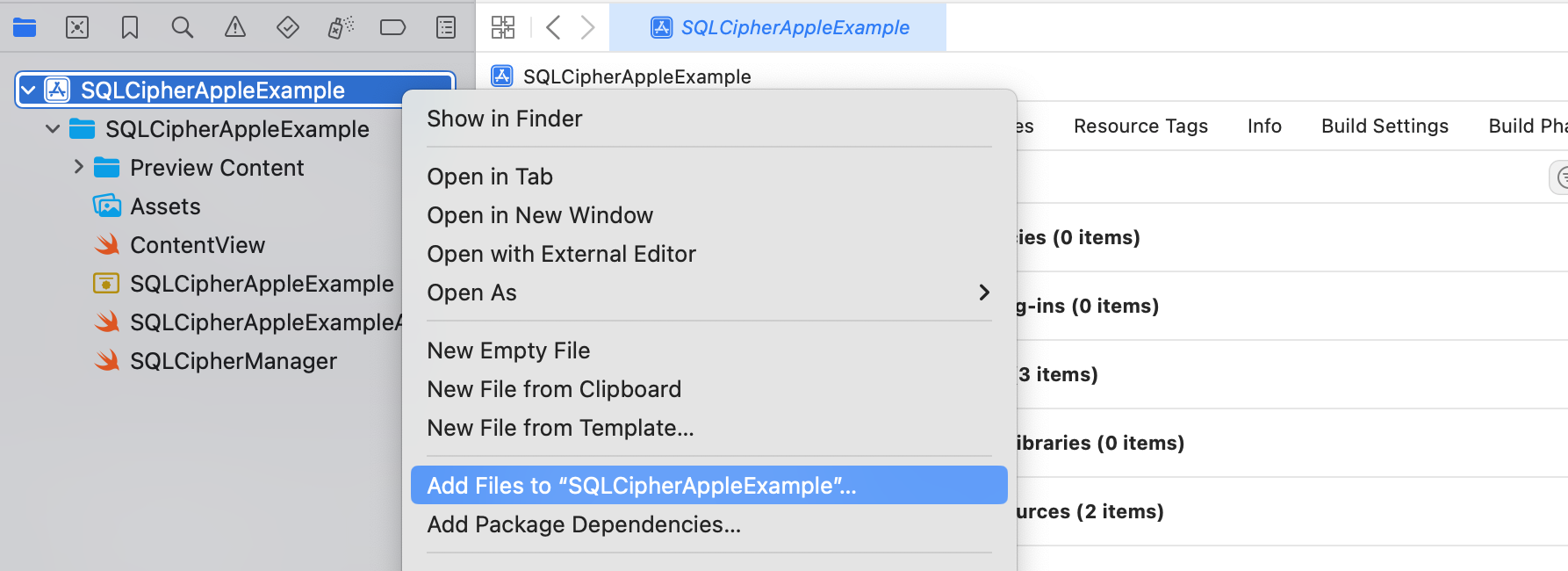
Right-click (or control-click) on your project's icon in the Project Navigator and select 'Add
Files
to
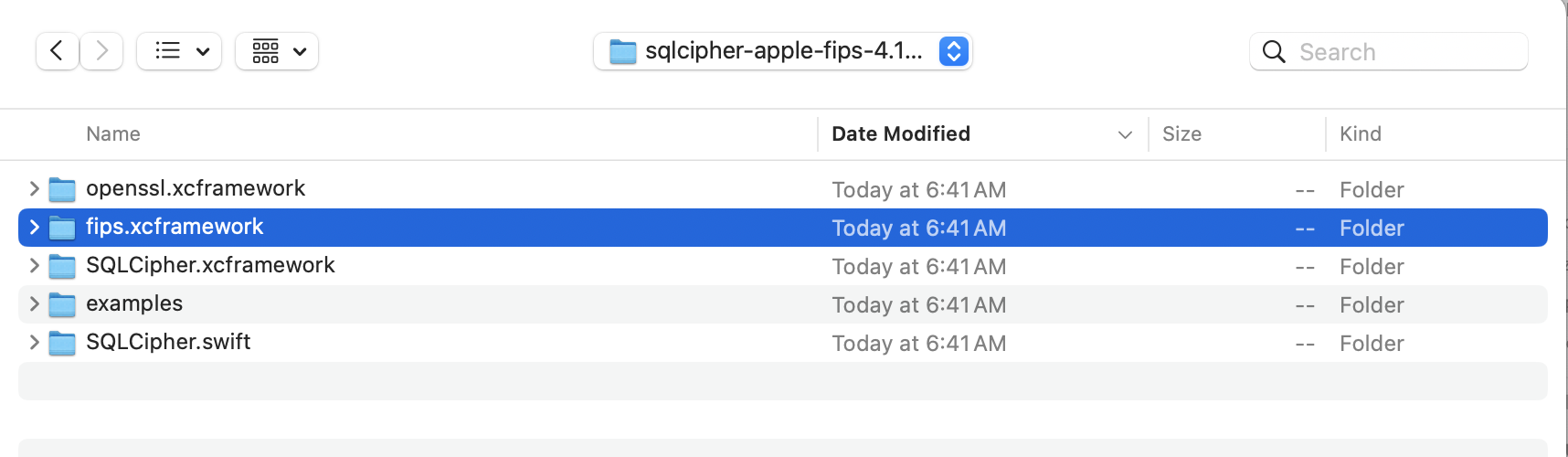
""...' again. This time select fips.xcframework from the
sqlcipher-apple-fips-VERSION
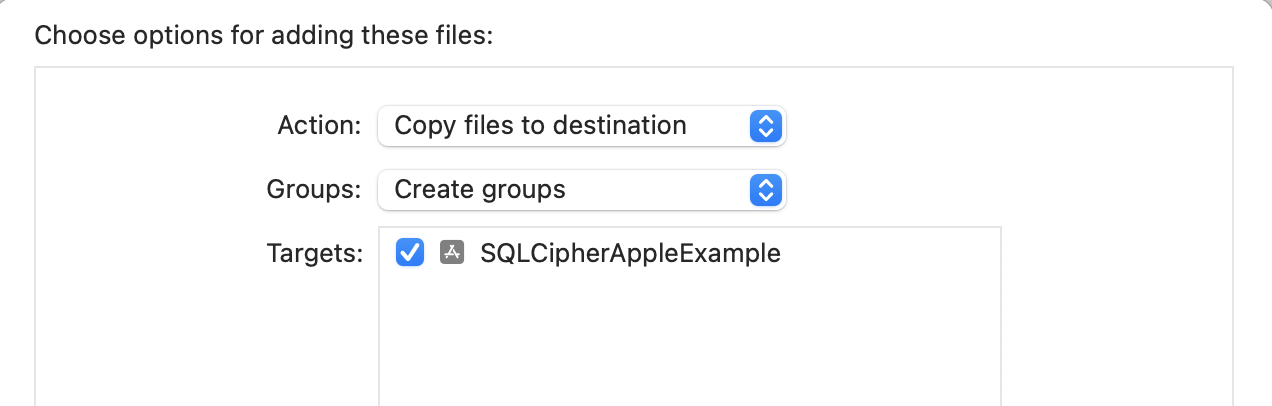
folder. Make sure you check the box for "Copy items if needed" so that the
fips.xcframework
copies into your project's directory and check the box next to your target to add it to the
target's
membership.
Remove fips.xcframework from Link Binary With Libraries
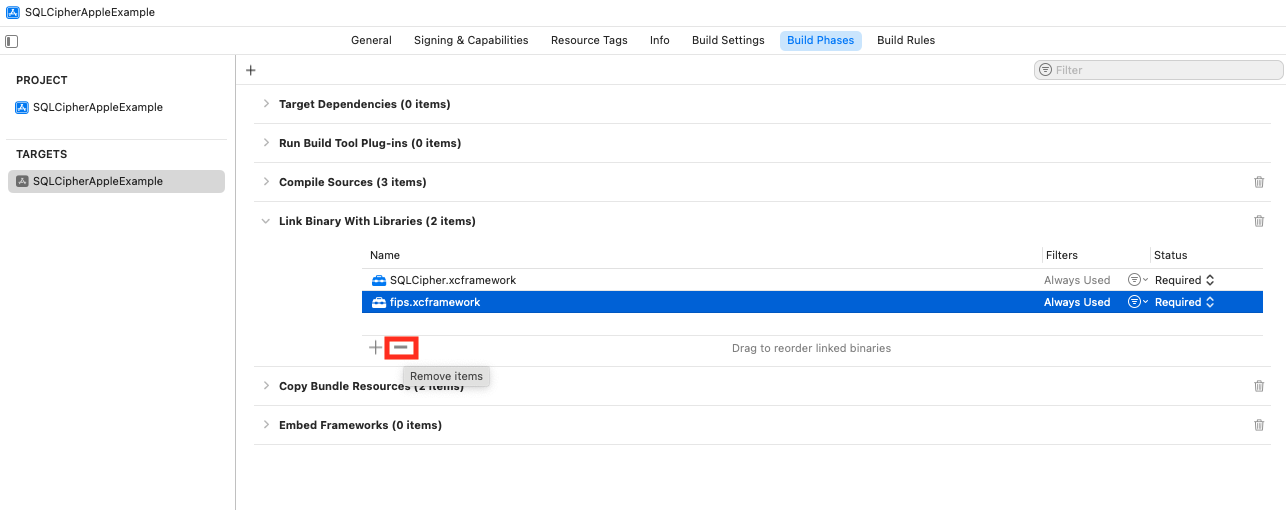
Select your Target > Build Phases > Link Binary with Library section, select fips.xcframework and
click the minus button to remove it from linking.
If you don't perform this step, you will receive this error message when
building for macOS: Unsupported mach-o filetype
Add openssl.xcframework to your Project (iOS Only)
If you're targeting iOS and you've purchased SQLCipher for iOS FIPS, you'll also need to add openssl.xcframework to your project.
Right-click (or control-click) on your project's icon in the Project Navigator and select 'Add Files to ""...'. Select openssl.xcframework from the sqlcipher-apple-fips-4.19.0 folder. Check "Copy items if needed" so that openssl.xcframework copies into your project's directory, and check the box next to your target to add it to the target's membership.
Embed Xcframeworks
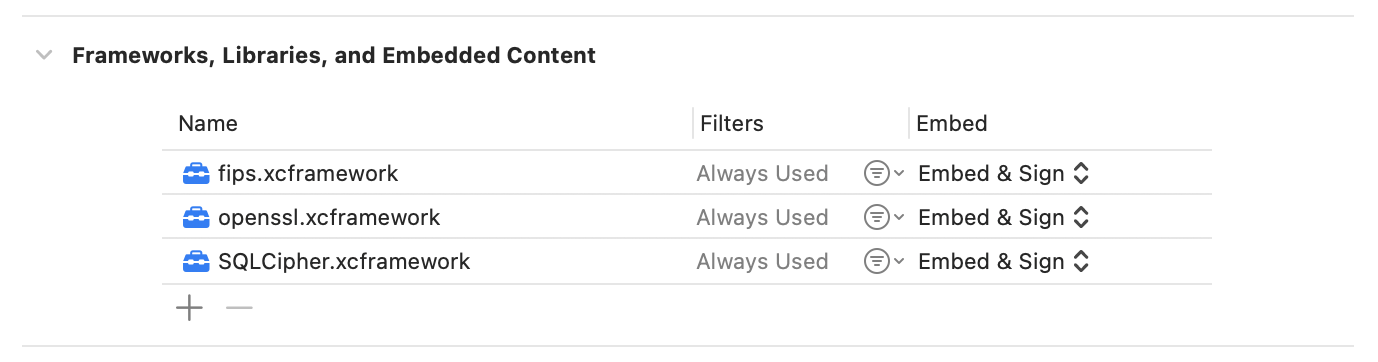
In the target's Frameworks, Libraries, and Embedded Content section, set SQLCipher.xcframework, fips.xcframework, and, if targeting iOS, openssl.xcframework to Embed & Sign.
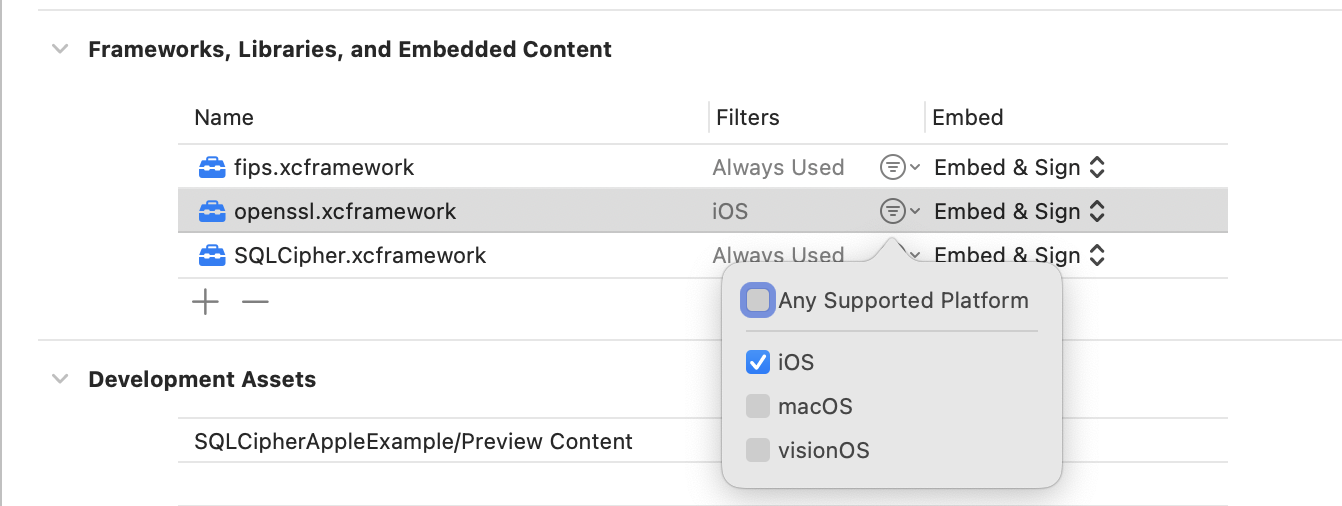
If you're using both SQLCipher for macOS FIPS and SQLCipher for iOS FIPS in the same target, set the filter on openssl.xcframework to iOS only.
Multiple Bundles Embedded in the Same Application Target
If your project contains multiple bundles embedded in the same application target (for example, a Helper Application embedded in the main application), repeat the steps above to integrate SQLCipher.xcframework, fips.xcframework, and openssl.xcframework (if applicable) for each bundle.
Check FIPS Mode
Applications using a FIPS 140-3 validated cryptographic module should, as a matter of practice, check that the library is operating in FIPS mode early in the application lifecycle. This ensures that the FIPS-enabled library has been integrated into the application, loaded properly at runtime, that all Power On Self Tests have completed successfully, and that the library is running in FIPS mode.
After opening the database, keying, and applying the license code, query PRAGMA cipher_fips_status. A result of 1 indicates FIPS mode.
Integration Code
Aside from the added PRAGMA cipher_fips_status check, database usage is identical to the standard integration. The example code below uses the FIPS variants of the Objective-C and Swift integration examples, which include the status check:
Objective-C Example
NSString *databasePath = [[NSSearchPathForDirectoriesInDomains(NSDocumentDirectory, NSUserDomainMask, YES) objectAtIndex:0]
                          stringByAppendingPathComponent: @"sqlcipher.db"];
sqlite3 *db;
sqlite3_stmt *stmt;
BOOL sqlcipherValid = NO;
if (sqlite3_open([databasePath UTF8String], &db) == SQLITE_OK) {
    const char* key = [@"BIGSecret" UTF8String];
    sqlite3_key(db, key, (int)strlen(key));

    // When using Commercial or Enterprise packages you must call PRAGMA cipher_license with a valid License Code.
    // Failure to provide a license code will result in an SQLITE_AUTH(23) error.
    // Trial licenses are available at https://www.zetetic.net/sqlcipher/trial/
    NSString *licenseQuery = [NSString stringWithFormat:@"PRAGMA cipher_license='%@';", @"### LICENSE CODE HERE ###"];
    sqlite3_exec(db, [licenseQuery UTF8String], NULL, NULL, NULL);
    int rc = sqlite3_exec(db, "SELECT count(*) FROM sqlite_master;", NULL, NULL, NULL);
    if (rc == SQLITE_OK) {
        rc = sqlite3_prepare_v2(db, "PRAGMA cipher_version;", -1, &stmt, NULL);
        if (rc == SQLITE_OK) {
            rc = sqlite3_step(stmt);
            if (rc == SQLITE_ROW) {
                const unsigned char *ver = sqlite3_column_text(stmt, 0);
                if (ver != NULL) {
                    // password is correct (or database is initialized), and verified to be using sqlcipher
                    NSLog(@"cipher_version = %s", ver);

                    sqlite3_finalize(stmt);
                    rc = sqlite3_prepare_v2(db, "PRAGMA cipher_fips_status;", -1, &stmt, NULL);
                    if (rc == SQLITE_OK) {
                        rc = sqlite3_step(stmt);
                        if (rc == SQLITE_ROW) {
                            const unsigned char *fipsStatus = sqlite3_column_text(stmt, 0);
                            if (fipsStatus != NULL) {
                                sqlcipherValid = YES;
                                // password is correct (or database is initialized), and verified to be using sqlcipher
                                NSLog(@"cipher_fips_status = %s", fipsStatus);
                            }
                        }
                    }

                }
            }
            sqlite3_finalize(stmt);
        }
    }
    sqlite3_close(db);
}
Swift Example
Here's an example of using the API SQLCipher provides in Swift 5:
var rc: Int32
var db: OpaquePointer? = nil
var stmt: OpaquePointer? = nil
let password: String = "correct horse battery staple"
rc = sqlite3_open(":memory:", &db)
if (rc != SQLITE_OK) {
    let errmsg = String(cString: sqlite3_errmsg(db))
    print("Error opening database: \(errmsg)")
    return
}
rc = sqlite3_key(db, password, Int32(password.utf8CString.count))
if (rc != SQLITE_OK) {
    let errmsg = String(cString: sqlite3_errmsg(db))
    print("Error setting key: \(errmsg)")
}

// When using Commercial or Enterprise packages you must call PRAGMA cipher_license with a valid License Code.
// Failure to provide a license code will result in an SQLITE_AUTH(23) error.
// Trial licenses are available at https://www.zetetic.net/sqlcipher/trial/
rc = sqlite3_exec(db, "PRAGMA cipher_license = '### LICENSE CODE HERE ###';", nil, nil, nil)
if (rc != SQLITE_OK) {
    let errmsg = String(cString: sqlite3_errmsg(db))
    print("Error with cipher_license: \(errmsg)")
}
rc = sqlite3_prepare(db, "PRAGMA cipher_version;", -1, &stmt, nil)
if (rc != SQLITE_OK) {
    let errmsg = String(cString: sqlite3_errmsg(db))
    print("Error preparing SQL: \(errmsg)")
}
rc = sqlite3_step(stmt)
if (rc == SQLITE_ROW) {
    if let cipherVersion = sqlite3_column_text(stmt, 0) {
        print("cipher_version: \(String(cString: cipherVersion))")
    } else {
        print("Not SQLCipher")
    }

} else {
    let errmsg = String(cString: sqlite3_errmsg(db))
    print("Error retrieiving cipher_version: \(errmsg)")
}

sqlite3_finalize(stmt)
rc = sqlite3_prepare(db, "PRAGMA cipher_fips_status;", -1, &stmt, nil)
rc = sqlite3_step(stmt)
if (rc == SQLITE_ROW) {
    if let cipherFipsStatus = sqlite3_column_text(stmt, 0) {
        print("cipher_fips_status: \(String(cString: cipherFipsStatus))")
    } else {
        print("Not SQLCipher")
    }

} else {
    let errmsg = String(cString: sqlite3_errmsg(db))
    print("Error retrieiving cipher_fips_status: \(errmsg)")
}

sqlite3_finalize(stmt)
sqlite3_close(db)
Key Derivation and Raw Keys
In most cases SQLCipher uses PBKDF2, a salted and iterated key derivation function, to obtain the encryption key. Alternately, an application can tell SQLCipher to use a specific binary key in blob notation (note that SQLCipher requires exactly 256 bits of key material), i.e.
PRAGMA key = "x'2DD29CA851E7B56E4697B0E1F08507293D761A05CE4D1B628663F411A8086D99'";
Once the key is set SQLCipher will automatically encrypt all data in the database! Note that if you don't set a key then SQLCipher will operate identically to a standard SQLite database.
Reference Application
A complete reference application is available under examples/sqlcipher-apple-fips-demo/ in the sqlcipher-apple-fips-4.19.0.zip package. It incorporates all of the configurations described above and can be used for testing or comparison purposes.
Testing and Verification
There are a number of ways that you can verify SQLCipher is working as expected in your applications before its release to users.
After the application is wired up to use SQLCipher, take a peek at the resulting data files to make sure everything is in order. An ordinary SQLite database will look something like the following under hexdump. Note that the file type, schema, and data are clearly readable.
% hexdump -C plaintext.db
00000000  53 51 4c 69 74 65 20 66  6f 72 6d 61 74 20 33 00  |SQLite format 3.|
00000010  04 00 01 01 00 40 20 20  00 00 00 04 00 00 00 00  |.....@  ........|
...
000003b0  00 00 00 00 24 02 06 17  11 11 01 35 74 61 62 6c  |....$......5tabl|
000003c0  65 74 32 74 32 03 43 52  45 41 54 45 20 54 41 42  |et2t2.CREATE TAB|
000003d0  4c 45 20 74 32 28 61 2c  62 29 24 01 06 17 11 11  |LE t2(a,b)$.....|
000003e0  01 35 74 61 62 6c 65 74  31 74 31 02 43 52 45 41  |.5tablet1t1.CREA|
000003f0  54 45 20 54 41 42 4c 45  20 74 31 28 61 2c 62 29  |TE TABLE t1(a,b)|
...
000007d0  00 00 00 14 02 03 01 2d  02 74 77 6f 20 66 6f 72  |.......-.two for|
000007e0  20 74 68 65 20 73 68 6f  77 15 01 03 01 2f 01 6f  | the show..../.o|
000007f0  6e 65 20 66 6f 72 20 74  68 65 20 6d 6f 6e 65 79  |ne for the money|
Fire up the SQLCipher application in simulator and look for the application database files under ~/Library/Developer/CoreSimulator/Devices/<Instance ID>/data/Containers/Data/Application/<Application ID>/Documents/. Try running hexdump on the application database. With SQLCipher the output should looks completely random, with no discerning characteristics at all.
% hexdump -C sqlcipher.db
00000000  1b 31 3c e3 aa 71 ae 39  6d 06 f6 21 63 85 a6 ae  |.1<..q.9m..!c...|
00000010  ca 70 91 3e f5 a5 03 e5  b3 32 67 2e 82 18 97 5a  |.p.>.....2g....Z|
00000020  34 d8 65 95 eb 17 10 47  a7 5e 23 20 21 21 d4 d1  |4.e....G.^# !!..|
...
000007d0  af e8 21 ea 0d 4f 44 fe  15 b7 c2 94 7b ee ca 0b  |..!..OD.....{...|
000007e0  29 8b 72 93 1d 21 e9 91  d4 3c 99 fc aa 64 d2 55  |).r..!...<...d.U|
000007f0  d5 e9 3f 91 18 a9 c5 4b  25 cb 84 86 82 0a 08 7f  |..?....K%.......|
00000800
Other sensible testing steps include:
- Attempt to open a database with a correct key and verify that the operation succeeds
- Attempt to open a database with an incorrect key and verify that the operation fails
- Attempt to open a database without any key, and verify the operation fails
- Programtically inspect the first 16 bytes of the database file and ensure that it contains random data (i.e. not the string
SQLite Format 3\0)