• Android
  • iOS
  • macOS
  • Windows

Download and Install Codebook

On android

  1. Visit this link on your Android device to install Codebook for free from Google Play.
  2. Once installed, tap Open in the Google Play Store (or tap on Codebook from your Home screen) to launch it for the first time and begin setup.

On ios

  1. Visit this link on your iOS device to install Codebook for free from the App Store.
  2. Once installed, tap Open in the App Store (or tap on Codebook from your Home screen) to launch it for the first time and begin setup.

On macos

  1. Download Codebook for macOS.
  2. When your download completes, double-click on Codebook.dmg (it should be in your Downloads folder).
  3. In the Install Codebook window that opens, drag and drop the Codebook icon onto the Applications folder to install the app.
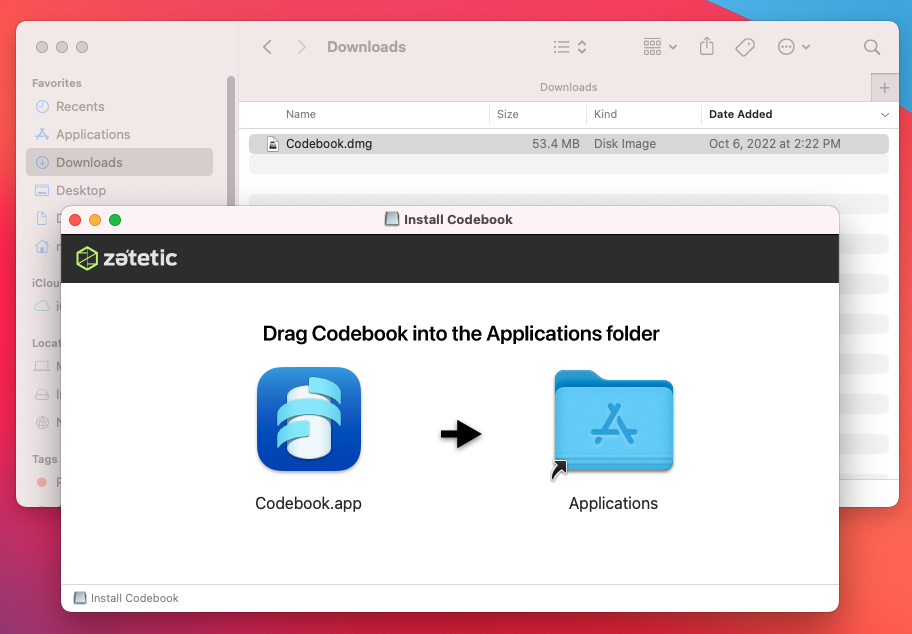
    Drag Coodebook.app to Applications

  4. Double-click on Codebook in your Applications folder (or type Codebook in Spotlight) to open Codebook and begin setup.

On windows

  1. Download the Codebook installer package for Windows.
  2. When your download completes, double-click on CodebookSetup.msi (or choose Run if prompted by your browser).
  3. Follow the installation wizard steps.
  4. Once Codebook is installed, launch the application.