Getting Started with Codebook Cloud
Follow these steps to install Codebook on your device for the first time.
On android
- Visit this link on your Android device to install Codebook for free from Google Play.
- Once installed, tap Open in the Google Play Store (or tap on Codebook from your Home screen) to launch it for the first time and begin setup.
On ios
-
Visit this link on your iOS
device to install Codebook for free from the App Store.
- Once installed, tap Open in the App Store (or tap on Codebook from your Home screen) to launch it for the first time and begin setup.
On macos
- Download Codebook for macOS.
- When your download completes, double-click on
Codebook.dmg (it should be in your Downloads folder).
-
In the Install Codebook window that opens, drag and drop the Codebook icon onto the Applications folder to install the app.
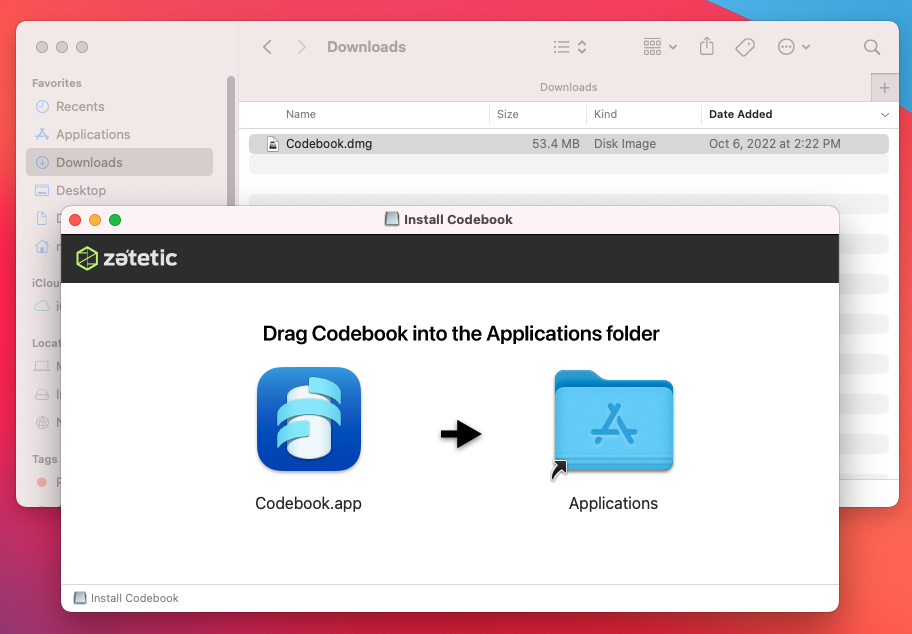
- Double-click on Codebook in your Applications folder (or type Codebook in Spotlight) to open Codebook and begin setup.
On windows
- Download the Codebook installer package for Windows.
- When your download completes, double-click on
CodebookSetup.msi (or choose Run if prompted by your browser).
- Follow the installation wizard steps.
- Once Codebook is installed, launch the application.
